 Search Tips
Menu Entry
The Menu Entry page is where you can modify your menus and assign recipes to them.
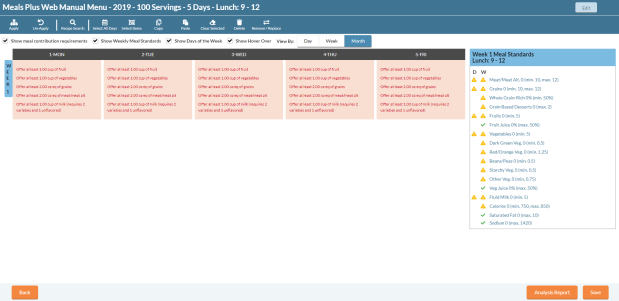
Page Header Information

- The page header contains the following information based on what was entered when creating the Cycle Menu:
Description
Fiscal Year
Servings
Days in Cycle
Nutrition Standard
- You can make changes to the Cycle Menu information by clicking the
 button.
Menu Entry Buttons

- Apply: Choose the dates and sites to apply the current menu to.
- Un-Apply: Choose which menus to remove from your districts site(s).
- Recipe Search: Search for recipes to add to the current cycle menu.
- Select All Days: All menu days will be selected.
- Select Items: Users can use a box selection tool to select items.
- Copy: Duplicate the current selection
- Paste: Pastes the current selection. Example: Users can copy a Recipe and paste it on to all Cycle Menu days.
- Clear Selected: Clears the current selection. (Does not delete.)
- Delete: Removes the Recipe from the Cycle Menu.
- Remove/Replace: Choose which recipes you want to remove from active menus or replace all existing instances of a recipe with a replacement one.
©2021 EMS LINQ Inc.
Meals Plus Web Help, 12/2021