 Search Tips
Provision 2
Provision 2 is a special USDA program that allows schools to establish, and claim meal reimbursements based on percentages to serve all meals at no charge for a 4-year period instead of processing new applications every year.
-
Schools electing this alternative must pay the difference between Federal reimbursement and the cost of providing all meals at no charge. The money to pay for this difference must come from sources other than Federal funds.
-
You can find out more about the Provision 2 program on the USDA’s website.
NOTE: Special USDA requirements apply for Provision 2 schools. At the beginning of the new school year, import the student file before setting up the provisional site information.
Provision 2 is allowed to be served for Base and Non-Base years.
-
When set to Provision 2 Base, the user will be able to serve Provision 2 but these sites will still be subject to verification. The application and students will be included in the verification counts.
-
When set to Provision 2 Non-Base, the user will be able to serve Provision 2 but these sites will be not be subject to verification. Therefore any application at the site set as Provision 2 Non-Base will not be selected for verification or counted in the application count or student count.
Meals Plus does not handle the qualification requirements that apply. Any questions concerning qualification for Provision 2 should be addressed by the state or local agency.
-
The Base Rates must be configured before you can create transactions.
-
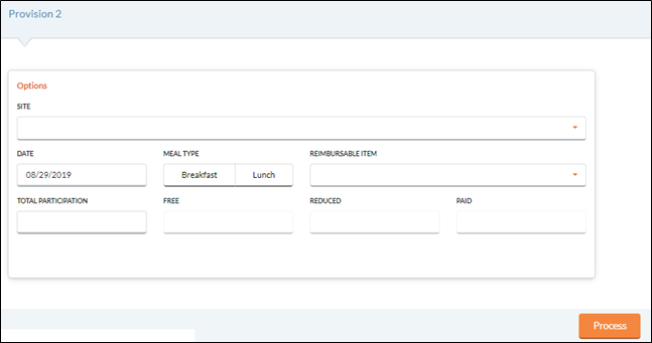
Select a site from the Site dropdown list.
-
A site must have its Alternate Provision set to Provision 2 Non Base or Provision 2 Base on the District Settings tab in Site Setup to display in this dropdown.
-
-
Select a serving date from the Date field using the calendar feature.
-
Future dates are not allowed.
-
-
Select Breakfast or Lunch for the Meal Type.
-
Select an item to be served to all students from the Reimbursable Item dropdown list.
-
Enter the Total Participation (number of meals served), and Meals Plus Web will automatically apply the percentages to calculate the number of Free, Reduced and Paid meals to be claimed.
-
Click the
 button if the participation count is correct. A confirmation message will appear: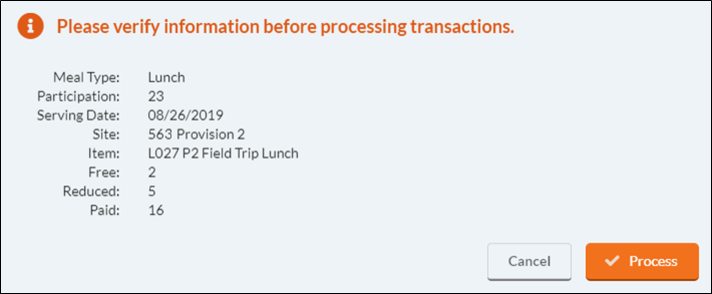
-
This process can only be run once per day for each school and meal.
NOTE: Please verify the Participation count before continuing.
-
-
Click the
 button if the participation count is correct. You will get a progress screen as the meals are processed.
 -
After the process is complete, you will still need to close the Daily Deposit using the regular procedures.
-
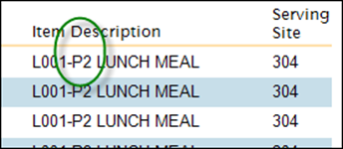
On Transaction History reports, Provision 2 meals will have ‘P2’ appended to the beginning of the Item Description:
©2021 EMS LINQ Inc.
Meals Plus Web Help, 10/2019