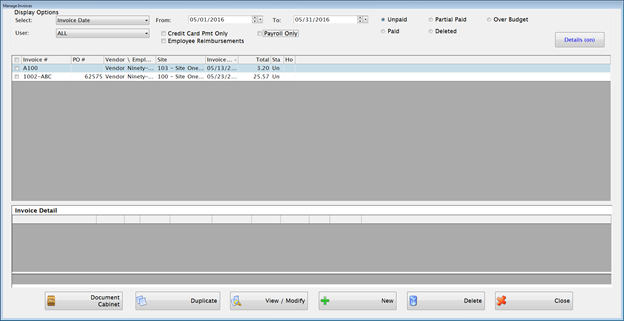
You can use this screen to view, modify or delete existing invoices, and add new invoices.
Complete the following form to manage invoices:
Select display options using Invoice Number, PO Number, Vendor/Employee Name, Site or Invoice Date.
Enter From and To dates, if desired.
NOTE:A Reinstated invoice will use the void date as the new Post Date and the original invoice dates in the Invoice Date and Due Date fields on the invoice form.
Select Unpaid to display posted invoices where no payment has been made yet.
Select Partial Paid to display invoices that are split between multiple banks where all of the checks have not been paid yet.
Select Over Budget to display invoices that need approval before they can be paid.
Select Paid to display invoices that have already been paid with a check or EFT.
Select Deleted to display invoices that were deleted without being paid.
Check the Credit Card Print Only box, if desired.
Check the Payroll Only box to display payroll invoices. If the box is not checked, payroll invoices will be excluded from the results.
Click on any column header to sort the grid.
Double-click
on any row or highlight it and click the  button to select an
invoice.
button to select an
invoice.
o It will display the invoice summary page. Then, you can use the Previous and Next buttons to view and edit the invoice details and header as described under Accrue Invoices.
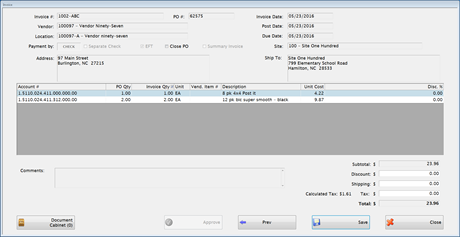
The Document Cabinet button will be displayed when the invoice highlighted is not a ST (Sales Tax) or PR (Payroll) invoice. If the user has rights, they can view, upload, scan, or export new documents.
 button.
 o The form will automatically populate with the data from the original invoice. All fields are editable—you can change payment by: Site, Invoice Date, Post Date, Accounts, and Quantities.
o All validation rules will be applied as the invoice is created. If it is over budget, it must be approved before checks can be written against it.
o If the original invoice is associated with a Purchase Order, you can duplicate the invoice, but the duplicate will not be associated with the purchase order.
o If you duplicate an invoice with an inactive vendor, the inactive vendor PLUS all active vendors will be in the dropdown list / search by vendor box. The inactive vendor will give an error message when you click on the NEXT button. The Inactive vendor displays so you can view all the information from the invoice being copied.
Click
the  button
to enter a new invoice accrual.
button
to enter a new invoice accrual.
Follow the steps outlined under Accrue Invoices.
Click
the  button
to delete one or more invoices by using the checkboxes on the left
side to select them.
button
to delete one or more invoices by using the checkboxes on the left
side to select them.
o You will receive a confirmation message for each invoice you are deleting.
To view Invoice
Details in the Lower Grid, the Details
button  must be click On.
If Details button is
clicked Off
must be click On.
If Details button is
clicked Off  only the Upper Grid will
show.
only the Upper Grid will
show.
The Invoice Detail lower grid will appear showing Account Number, Quantity, Unit, Unit Cost, Vender Item #, Merchandise, Discount, Shipping, Tax, Line Total and Description for all accounts included on invoice selected.

 NOTE: Invoices with zero dollar lines will be marked Paid after the check is written. Any zero dollar lines will be marked inactive.
Purchase Orders automatically close when invoices are accrued based on the dollar amount accrued for each account code.
o Within one PO, there may be multiple account encumbrances.
o When the sum of the accruals for a single account exceeds the PO’s total encumbrance for that account, that PO account line is automatically closed.
o The entire PO is automatically closed when the all the PO account lines are closed.
In Invoice Accrual, if you are referencing a PO and want to go ahead and close the PO without receiving everything that was ordered, check the Close PO box on the invoice accrual screen.
You can also delete a PO from Manage Purchase Orders and it will unencumber any remaining PO balances.
The PO is closed on the initial save of the invoice. The invoice does not have to be approved for the PO to be closed.
When adding an invoice against a PO, you can choose to pay the invoice in summary by checking the Summary Invoice box.
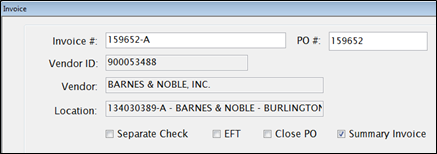
The PO will be summarized by account code and you can enter the dollar amount for each account this invoice is paying. The PO will be unencumbered for the amounts listed if an encumbrance remains on that account.
Once a PO is paid in Summary, all remaining invoices against that PO must also be paid in summary.

©2019 EMS LINQ, Inc.
Fund Management, revised 03/2019